Automations
Automations run scheduled prompts. The optional Workflows plugin runs saved recipes.
- Automations are a saved prompt plus a trigger. They run themselves, on a schedule or at a time you name, and can deliver the result to a channel.
- Workflows are a declared step recipe you run on demand. Each data step stores a receipt; the final summarize step only sees those receipts.
To schedule a workflow, install the Workflows plugin and assign its workflow tools to the automation’s agent. Ask Super Bot to create an automation with a prompt like Run my "Morning brief" workflow (id wf_123), using that agent.
See Workflows for the step kinds and receipt model.
Automations
An automation is a name, a prompt, a profile, and one trigger:
| Trigger | Shape | Scheduled behavior |
|---|---|---|
manual | none | Never starts by itself |
schedule | 5-field cron plus a timezone | Runs each time the cron matches |
runAt | an ISO timestamp plus a timezone | Tries to run once at that instant, then disables itself |
The profile is which agent soul, tools, and skills the run uses. Edit an automation to pick a different profile; the detail view shows the bound profile name. Creating from the API without a profileId uses the org default profile. Creating from chat without a profileId uses the chat profile. Members cannot bind Super Bot.
Cron is validated on save, so a malformed expression is rejected rather than silently never firing. The timezone defaults to the one in your user config. nextRunAt is computed from the cron and shown in the list, which is the fastest way to check that a schedule means what you think it means.
A runAt automation whose timestamp has already passed is not scheduled. Disabled automations are not scheduled either, whatever their trigger.
The worker and schedule reloads
Scheduled runs are driven by the automation worker, a separate process managed by PM2 alongside the channel bridges. It reports a heartbeat, so Control center → Workspace → Workers tells you whether schedules are actually being served. If the worker is down, manual runs from the dashboard still work and scheduled ones do not fire.
The worker loads the schedule list at startup and reloads it on a polling interval. The default interval is five minutes, and it accepts 1 to 1440 minutes. An organization admin can change it on System → Organization, on the Skill curator card. Polling doesn't send a live schedule-change event to the worker.
This reload boundary matters for new schedules. A schedule created just after a reload can wait for the next poll before it is registered. A one-time runAt that passes before the worker sees it is missed rather than caught up later. Allow for the polling interval when you create time-sensitive one-time automations, and make sure the worker is running before you create them.
See Docker for how the worker is started in a container.
Run history
Every run is recorded with a status of running, completed, or failed, plus its output or error and start and finish timestamps. Open a run to read the full output or copy its text. Opening an automation automatically marks its runs read, so the unread dot and notification count clear without a separate Mark runs read control.
You can start any enabled automation manually with Run now, the run API, or the chat automation tool. Run again appears on a failed run and starts the automation again. It does not retry a completed one-time runAt: that automation disables itself before its first run, including when that run fails, so Run again reports that it is disabled. Create another one-time automation when you need a fresh timestamp.
Unread run counts feed the Notifications page, so a schedule that started failing overnight is visible without opening each automation.
Delivering the result
An automation can post its result to a channel instead of leaving it in the run log.
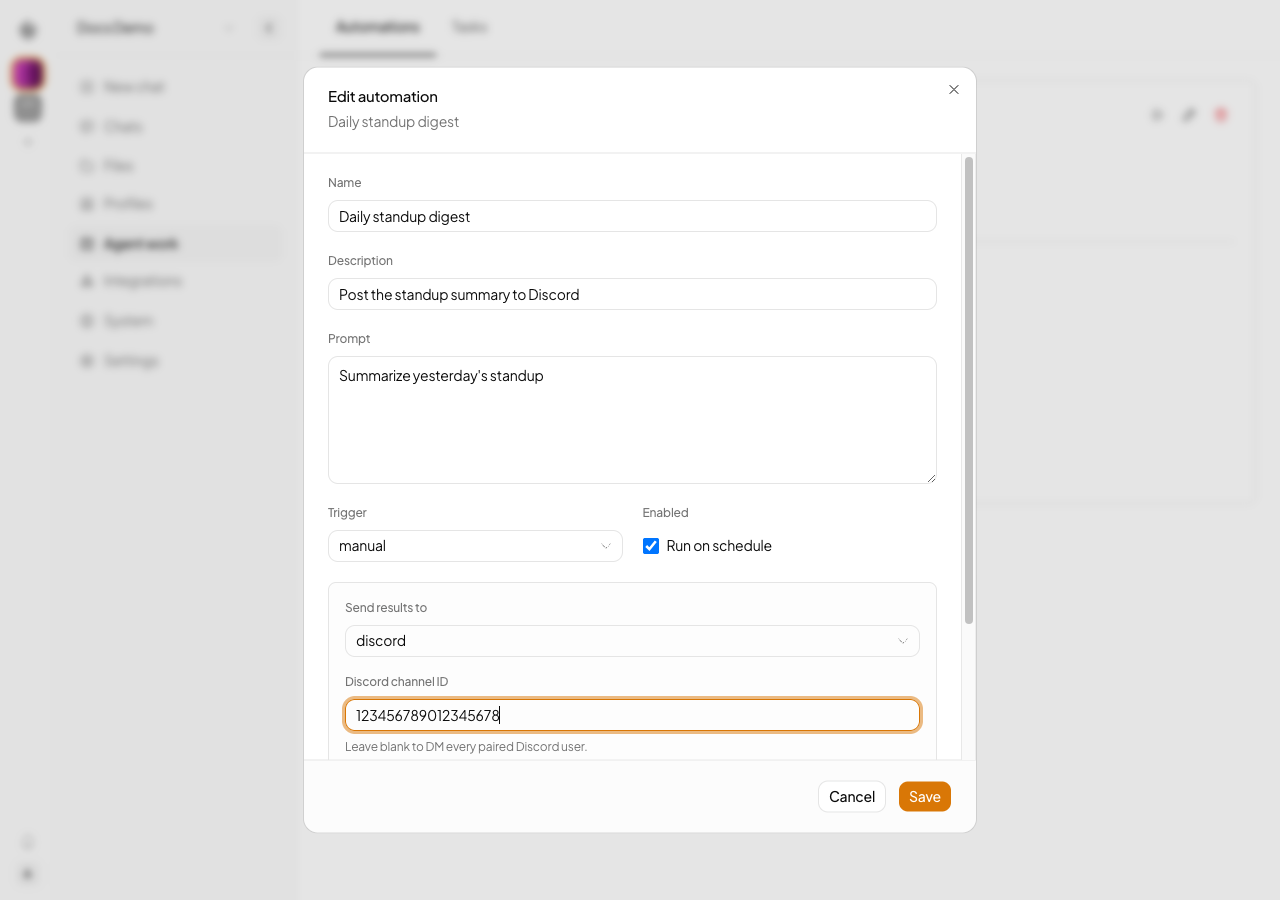
| Channel | Target |
|---|---|
telegram | All paired users, or one chatId |
discord | All paired users by DM, or one channel by channelId |
whatsapp | All paired users |
email | The to address, which is required |
notifyOn decides which runs deliver: success (the default), failure, or both. Each run records sent, failed, or skipped when delivery is configured and attempted. A run with no delivery configuration has a null delivery status; null does not mean that delivery was skipped. Failed deliveries also record the error.
Delivery configuration is validated on save against the channels the instance has. Pointing an automation at a channel with no configured bridge fails at save time instead of silently failing on a later run.
Permissions
Creating or changing an automation requires a non-viewer role. A caller-supplied profileId on create or update is checked against what that caller may use, so a member cannot bind an automation to the bash-capable Super Bot profile. See Multi-tenancy for the role model.
API
| Method | Path |
|---|---|
GET POST | /v1/automations |
GET PUT DELETE | /v1/automations/:automationId |
POST | /v1/automations/:automationId/run |
GET | /v1/automations/:automationId/runs |
POST | /v1/automations/:automationId/runs/mark-read |
POST | /v1/automations/draft |
Automation runs carry a run id rather than a session id. Anything scoped per conversation, such as the token optimiser ledger, scopes to that run.