Providers
Configure a provider
- Sign in as a platform admin
- Open Control center → Agent tools → AI Providers
- Add a provider and paste your API key
- Browse or enter models for that provider
- Assign a model to each profile that should use it
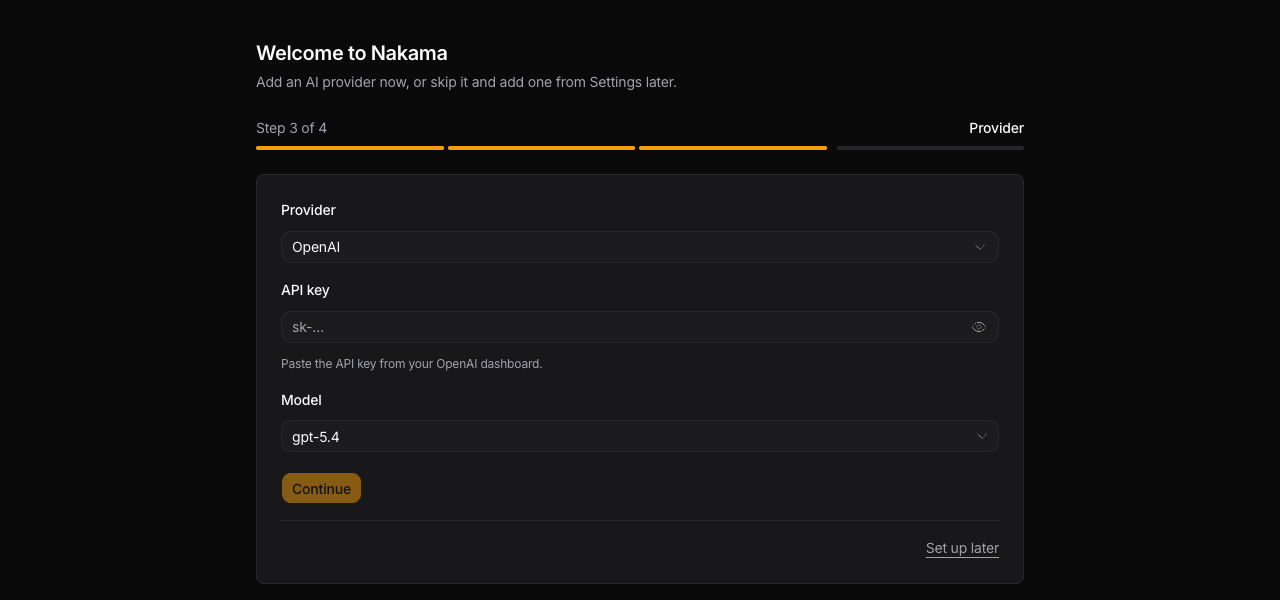
On first run, Nakama can also prompt for a provider during the setup wizard. See First-time setup.
Settings are saved in ~/.nakama/config.ini (or under NAKAMA_CONFIG_DIR when set).
During First-time setup, the wizard uses the same provider form:
Mount provider API keys
Keep provider secrets outside Nakama's data directory by setting the provider's
API-key variable with a _FILE suffix. Its value is the path to a readable
secret file:
OPENAI_API_KEY_FILE=/run/secrets/openai_api_keyThis works for built-in providers that expose an API-key environment variable,
including ANTHROPIC_API_KEY_FILE and GEMINI_API_KEY_FILE. On first boot,
set NAKAMA_PROVIDER as well when more than one provider secret is mounted.
Nakama trims the file contents and leaves the API key empty in its saved
settings. A directly set API-key variable takes priority over its _FILE
partner. Startup fails when a configured secret file cannot be read.
Supported providers
Nakama supports these built-in provider types:
| Provider | Notes |
|---|---|
| OpenAI | GPT models; required for OpenAI audio transcription (Telegram voice notes); can also drive local image-generation and transcription endpoints via a custom base URL |
| ChatGPT (Plus/Pro) | Sign in with ChatGPT; uses your plan quota via Codex (not API credits). One account per Nakama instance |
| Grok (SuperGrok / Premium+) | Sign in with your xAI subscription; API eligibility depends on your plan |
| Anthropic | Claude models |
| OpenRouter | Route to many models through one API key |
| Gemini | Google Gemini models |
| DeepSeek | DeepSeek models |
| Netra Runtime | Discover models with your Netra API key; choose an available model |
| Doubao (Volcengine) | Seed models via Volcengine Ark China (https://ark.cn-beijing.volces.com/api/v3); set DOUBAO_API_KEY |
| Together AI | Open-source and hosted models via Together |
| Xiaomi MiMo | MiMo models via api.xiaomimimo.com (pay-as-you-go; override base URL for Token Plan clusters) |
| Vercel AI Gateway | One Vercel key → many labs' models (creator/model ids) |
| Mistral | Mistral models (Small 4, Medium 3.5, Large 3, Ministral 3) |
| Qwen (DashScope) | Alibaba DashScope international (QWEN_API_KEY) |
| Qwen (DashScope CN) | Alibaba DashScope China (QWEN_CN_API_KEY) |
| Perplexity Sonar | Search-grounded Sonar models with citation links |
| Cerebras | Cerebras models |
| Cloudflare Worker AI | Workers AI models; add an API key and account ID in AI Providers (saved to config.ini). Llama 3.1 8B is the cheaper catalog option. CLOUDFLARE_ACCOUNT_ID is a fallback only |
| Fireworks | Fireworks AI models |
| Ollama | Local or Ollama Cloud; multiple instances allowed |
| OpenCode Go | OpenCode Go endpoint |
| Custom (OpenAI-compatible) | Any OpenAI-compatible API; multiple instances allowed |
Most built-in types allow one configured instance each. Ollama and Custom (OpenAI-compatible) can be added multiple times (for example local Ollama plus a remote compatible endpoint).
Netra Runtime
- In Settings → LLM providers → Add provider, choose Netra Runtime.
- Enter your Netra API key and browse the models available to your organization.
- Choose a model, then assign it to a profile.
Nakama currently offers DeepSeek V4 Flash 0731. Netra documents its tool-call flow. V4.1 Flash needs a tool-turn check before Nakama can offer it for agents.
Netra charges the rates shown for your organization. Enter its input, cached input, and output rates in the model settings to show cost in Nakama. Leave rates blank when you do not know them.
The CLI can also use NETRA_API_KEY with an exact NETRA_MODEL ID. See Netra's model guide for model IDs and features.
Provider-specific features
Some capabilities depend on the active provider:
- Web search (
web_searchtool): OpenAI or Anthropic with a valid API key; not available on OpenRouter or ChatGPT (Plus/Pro). Configure a custom back-end (Exa, Firecrawl, or any JSON search endpoint) in AI Providers → Web search to lift this restriction - Audio transcription (Telegram voice notes): needs a transcription model in AI Providers → Audio transcription model, backed by an OpenAI provider or an OpenAI-compatible provider with a base URL (ChatGPT Plus/Pro cannot replace this)
- Image parsing: used when the chat model cannot see images. Set AI Providers → Image parsing model. The list only includes models marked as vision-capable. For a custom endpoint, turn Vision on for that model under AI Providers
- Responses API endpoints: a custom endpoint that serves
/responsesrather than/chat/completions. Set API to Responses under AI Providers, or answerresponsesin the CLI setup wizard. Required for endpoints that do not serve chat/completions at all, and it keeps reasoning available alongside tools on models that reject the pair on chat/completions - Context window: models in the built-in catalog carry their own size. A model Nakama does not recognise (a custom endpoint, an OpenRouter slug, a self-hosted build) falls back to 128k, which cuts history early on a larger model and overflows a smaller one. Set Context for that model under AI Providers to the real token window; leave it on auto to keep the fallback. Browsing models.dev fills it in for you
- Coding agent provider passthrough — spawn-time credentials for Claude Code / Codex / OpenCode; see Coding agent
Per-profile models
Each profile selects its own model from the configured providers. Two profiles in the same org can use different providers or models.
Platform admins manage provider credentials globally. Org members use the models assigned to their profiles.
ChatGPT (Plus/Pro)
ChatGPT Plus/Pro is not an OpenAI API key. In AI Providers, choose ChatGPT (Plus/Pro), click Sign in with ChatGPT, open the device link, enter the code, then save.
- One ChatGPT account covers the whole Nakama instance (operator use, not per-user login)
- Usage comes from your ChatGPT plan quota, not pay-as-you-go API billing
- Whisper transcription and image generation still need a regular OpenAI API-key provider or an OpenAI-compatible provider with a base URL
- Coding-agent provider passthrough does not apply to this provider type. Use Control center → Integrations → Coding agents → Harness login with
codex loginfor Codex CLI subscription use
Grok (SuperGrok / Premium+)
Connect your Grok subscription to chat with Grok models in Nakama without entering an API key.
- In AI Providers → Add provider, choose Grok (SuperGrok / Premium+).
- Click Sign in with Grok, open the displayed link, and enter the code. For Premium+, use the xAI account linked to your X account.
- Approve access, choose a model, and click Add provider.
Nakama refreshes the saved session automatically. Use Reconnect Grok if access is revoked. The connected account is shared across the Nakama instance.
xAI controls subscription API eligibility and usage limits. A successful sign-in does not guarantee model access; a 402 or 403 response can indicate a quota or plan restriction.
Self-hosted / local models for image generation and transcription
Keep prompts, images, and audio entirely inside your network (data residency) by pointing image generation and audio transcription at an OpenAI-compatible backend you host. Nakama never calls api.openai.com for these flows when the provider carries a base URL.
Add a local OpenAI-compatible provider
- In AI Providers → Add provider, choose Custom (OpenAI-compatible).
- Set Base URL to your local endpoint (for example
http://localhost:8000/v1orhttp://100.64.0.1:8000/v1for a Tailscale peer). - Enter an API key. Local backends often ignore it, but the field is required — use any non-empty placeholder (
local-key,ollama, etc.) if your server does not verify one. - Add at least one model under Models (
gpt-image-2, a Whisper id, etc.). For a model you set as the transcription or image-generation model, enable the matching capability (image Vision toggle for image parsing) under AI Providers.
Image generation
Set Image generation model in AI Providers. The dropdown lists the models of every compatible provider, stored as <providerId>::<modelId>, so a gateway that namespaces its ids works too:
p-my-local::cb/gpt-image-2The model must be one of that provider's models, otherwise saving fails. The older openai_compatible::gpt-image-2 selection still works and uses your default provider, or the first compatible one with a base URL. Usage is priced from the rates you enter on that model.
Nakama requests POST {baseUrl}/images/generations (for example http://localhost:8000/v1/images/generations) with the same body OpenAI sends. A backend exposes images as b64_json works unchanged.
Audio transcription
Set Audio transcription model to the Whisper id your endpoint serves, for example:
p-my-local::whisper-1where p-my-local is the id of the local provider instance. Nakama sends a multipart POST {baseUrl}/audio/transcriptions with the audio file and the model name — the same contract as OpenAI's transcriptions endpoint.
Verify the two flows
Both routes answer over the configured base URL, so a deployment whose only provider is a local endpoint makes no call to api.openai.com:
# Transcription
curl -sS "$BASE_URL/v1/audio/transcriptions" \
  -F model=whisper-1 -F file=@voice.ogg

# Image generation
curl -sS "$BASE_URL/v1/images/generations" \
  -H "Authorization: Bearer $KEY" \
  -H "Content-Type: application/json" \
  -d '{"model":"gpt-image-2","prompt":"a cat","n":1,"output_format":"png","size":"1024x1024"}'
Next steps
- First-time setup — complete the setup wizard
- Profiles — assign models and tools per bot
- Builtin tools — provider-dependent tool availability