Skills
A skill is a reusable instruction bundle you assign to a profile.
Think of it as a saved workflow:
- The profile keeps its main identity in soul files or
systemPrompt - A skill adds a focused procedure for a specific kind of task
- The agent can match and use that procedure when it is relevant
Use skills when you want the bot to follow the same steps repeatedly without cramming everything into the main prompt.
Why skills matter
Skills help keep profiles clean.
For example:
- A support bot can have one skill for bug triage
- A content bot can have one skill for rewriting release notes
- An ops bot can have one skill for incident summaries
This gives you smaller, clearer building blocks instead of one giant prompt.
How skills fit with profiles
Skills are assigned per profile, just like tools and MCP servers.
| Layer | What it controls |
|---|---|
Soul / systemPrompt | The bot's overall identity and rules |
| Skills | Repeatable workflows or task-specific instructions |
| Tools | Actions the bot is allowed to take |
| MCP servers | Extra external tools |
A profile can have many skills, and the same global skill can be assigned to more than one profile.
Two kinds of skills
Global skills
Global skills live in the shared skill library:
~/.nakama/agent/skills/These are useful when the same workflow should be reusable across multiple profiles.
Profile-scoped skills
Profile-scoped skills live inside one org/profile workspace:
~/.nakama/orgs/{orgId}/profiles/{profileId}/skills/These are useful when the workflow only makes sense for one specific bot.
Skill file format
Each skill is stored in its own directory with a SKILL.md file.
Minimal example:
---
name: weather
description: Use when the user asks for a weather forecast.
---

# Skill instructions

1. Ask for the city if missing.
2. Check the forecast.
3. Summarize it clearly.
Required frontmatter:
| Field | Required | Meaning |
|---|---|---|
name | Yes | Lowercase letters, numbers, and hyphens only |
description | Yes | Short summary of when the skill should be used |
Optional frontmatter:
| Field | Meaning |
|---|---|
disable-model-invocation | Only run on explicit invocation |
include-body-on-match | Include the full body when the skill auto-matches |
Skills with tools
A skill can also include a local tool module in the same directory:
tool.tstool.jstool.py
When present, the dashboard shows the skill as includes tool.
This is useful when the workflow needs both:
- Instructions in
SKILL.md - A small custom tool that the skill can use
tool.ts and tool.js are imported into the server process. tool.py runs as
a separate process instead: Nakama spawns python3 <file>, writes the call
arguments to stdin as JSON, and reads one JSON value back from stdout. It gets a
trimmed environment (PATH, NAKAMA_WORKSPACE_ROOT, and NAKAMA_CONFIG_DIR
only for server-shipped skills) and 30 seconds to answer.
# tool.py
import json
import sys


def run(input, context):
    return {"total": input["quantity"] * input["price"]}


if __name__ == "__main__":
    print(json.dumps(run(json.loads(sys.stdin.read() or "{}"), {})))
More than one script
A skill often outgrows a single file. List the extra scripts in the frontmatter and each one becomes its own tool, named after the skill and the file:
---
name: invoicing
description: Price an order and write the invoice.
scripts: scripts/pricing.py, scripts/invoice.py
---
Paths are relative to the skill directory, separated by commas, and only .py
is accepted today. Each script needs the same run(input, context) and
__main__ block as tool.py above. A script that is in the skill but not
declared, and is not named tool.py, is reported in the dashboard as not
runnable rather than silently ignored.
A script can import its siblings by bare name. Python puts the running script's
own directory first on sys.path, so scripts/invoice.py can import pricing
with no packaging.
Whose code runs
A skill's tool module and scripts are host code: tool.py and every declared
script are spawned as a process, and tool.ts / tool.js are imported into the
server. A skill that ships with Nakama, or that an operator installed globally,
always runs.
A skill written into a profile's own skills directory — by hand, or by an
organization member asking the agent to create one with skill_manage — does
not, until the org reviews its writes. Turn on Skill write approval for the
profile in Agent → your agent and every write to that profile's skills is
staged for an admin to approve. Code already in the skill stays blocked until
reviewed: ask the agent to use skill_manage with action: approve_code, the
skill name, and the code file path, then approve its proposal. Each code file
must match what the admin approved; changing it blocks the skill's code again.
With approval off, the skill still reads as instructions, and calling its tool
returns an error saying the code is not runnable here.
Python skill processes for member-authored skills are spawned without
NAKAMA_CONFIG_DIR, so they are not told where the deployment keeps its
configuration and API keys.
What Python is available
The published image ships python3 and the standard library. There is no pip
and no third-party package, so a script that imports one fails on its first call
with ModuleNotFoundError.
To add packages, build a virtualenv on the host and point Nakama at its interpreter before starting the server:
python3 -m venv /opt/nakama-python
/opt/nakama-python/bin/pip install matplotlib
export NAKAMA_PYTHON_BIN=/opt/nakama-python/bin/python3
This is install-wide: every Python tool and every skill script in every organization uses that interpreter.
How skills are used at runtime
When a profile starts a chat, Nakama appends the assigned skills catalog to the agent prompt.
On each user turn, Nakama can also attach matched skill context for the current message.
That means skills are not a separate bot. They are extra behavior layers attached to a profile.
Invoking skills in chat
In the web chat composer, type / to open a picker for skills assigned to the active profile.
You can:
- Type to filter the skill list
- Use Arrow Up and Arrow Down to move through options
- Press Enter to insert the selected skill
- Press Escape to close the picker
Selecting a skill inserts an explicit invocation like:
/skill weatherThe composer highlights the selected skill, but the message still sends as plain text so it works with the normal skill matcher.
The slash picker also reserves /learn — use it to turn notes, a URL, a local folder, or the workflow you just finished into a reusable skill. See Self-improving skills.
Nakama also ships bundled skills for system workflows. The create-profile bundled skill is assigned only to Super Bot, so profile-authoring instructions load when Super Bot is asked to create a profile without adding those instructions to ordinary profile prompts. That skill runs a confirm-first factory: draft soul files in chat, wait for explicit confirmation, then create.
For more detail, see Agent prompts.
How to create and assign skills
There are two common paths.
From the dashboard
Platform admins can:
- Open Agent
- Open a profile
- Use the Skills section to add, assign, unassign, or inspect skills
The dashboard also supports a shared skill library through the skills API and sync flow.
From the agent itself
Profiles receive bundled skills for common workflows:
create-automation— scheduling, reminders, and saved automationsskill-installer— find and install skills from public GitHub repositories into the current profilemanage-skills— create, patch, edit, and delete profile-scoped skills (and supporting files under a skill directory) with theskill_managetool (file tools still inspect skills; they cannot write underskills/*/whenskill_manageis present)update-profile-memory— record facts in activeMEMORY.mdvia file toolsarchive-profile-memory— move facts from activeMEMORY.mdintomemory-archive/without deleting themsave-artifact— save files the agent produces (reports, documents, generated text) underartifacts/viawrite_filecoding-agent— invoke a coding agent for repo work viabash(Super Bot by default; see Coding agent)agent-browser— interactive browser automation viabash(opt-in; see Agent browser)
Every profile receives the default bundled skills above when they are installed and synced on the server, including manage-skills for skill authoring. Nakama backfills missing default bundled skills onto existing profiles during startup. Super Bot additionally receives its Super Bot-specific skills, while opt-in skills such as agent-browser still require assignment.
To reuse a skill from GitHub, ask in web or CLI chat: “Install this skill” and paste its public GitHub directory or SKILL.md link. The agent installs it for the current profile, ready on the next turn. If write approval is enabled, an admin must approve it first. References, scripts, and assets are included. Reinstalling the same skill restores missing files. External programs required by a skill still need separate setup. Existing skills with different content are not overwritten.
When manage-skills or skill-installer is assigned, interactive chat gets a skill_manage tool (install / create / patch / edit / delete / write_file / remove_file). Creates auto-assign to the profile. Automations and messaging channels do not receive skill_manage. For crystallization, optional write approval, admin review UI, and the Phase 3–4 roadmap, see Self-improving skills.
Write approval (optional)
Org admins can enable skill write approval under Control center → Workspace → Organization → Skill write approval. When the gate is on, skill changes wait for admin review before they go live; see Self-improving skills. Unused agent- and human-authored skills can be archived (moved, never deleted) by the optional skill curator on the same Organization page. A separate opt-in can also consolidate overlapping agent skills with an LLM; see Self-improving skills.
Bundled system skills
update-profile-memory, archive-profile-memory, and save-artifact replace older dedicated builtins. They teach the agent how to use generic file tools safely:
- Memory write path: read or create
MEMORY.md, append a dated- bulletunder the user's timezone date, keep the# Memory Logpreamble, stay under 4096 bytes - Archive path: copy exact bullets to
memory-archive/YYYY-MM.md, then remove them fromMEMORY.md - Artifact path: save the file the agent produced with
write_fileorwrite_docxunderartifacts/{filename}with the correct file extension. Nakama derives the file type, size, and timestamp automatically. Usewrite_filefor text, Markdown, HTML, JSON, and code; usewrite_docxwhen the user wants a real Word document.
These skills use include-body-on-match: true, so the full procedure loads when the user's message matches the skill description. The chat wrapper also mentions memory skills when read_file and edit_file are available, and save-artifact when write_file is available.
They are hidden from the /skill slash picker (like create-automation and manage-skills) because they are system workflows, not user-authored skills. Agents can still invoke them explicitly with /skill update-profile-memory, /skill archive-profile-memory, or /skill save-artifact.
Coding agent
The coding-agent bundled skill teaches when to invoke a coding agent, how to install CLIs via bash, when to ask which backend to use, and how to summarize CLI results. Super Bot receives it by default. Setup and runtime flow are in Coding agent.
Agent browser
The agent-browser bundled skill teaches agents to drive interactive browsers through bash for login walls, forms, and client-rendered pages. Setup, usage, session policy, optional Cloak stealth Chromium, and troubleshooting are in Agent browser.
Version history
Skills change over time. People edit them, and agents patch them. Version history shows each change, so you can see what changed, who changed it, and go back if a change makes the skill worse.
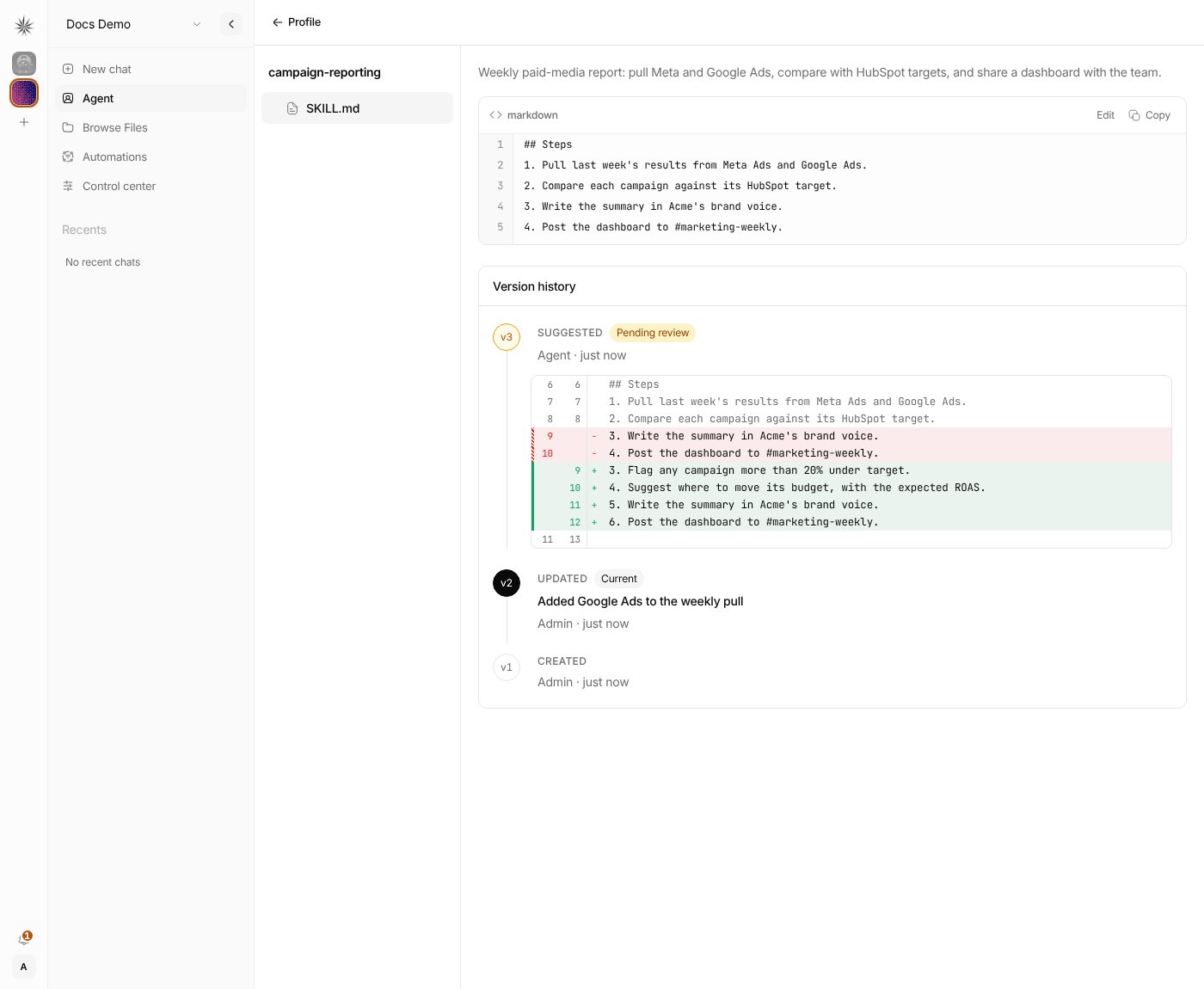
To open it:
- Open Agent
- Open a profile
- In the Skills section, open a skill
- Scroll below
SKILL.mdto Version history
Each row is one saved version of SKILL.md:
| Label | Meaning |
|---|---|
| Created | The first version, saved when the skill was created in the dashboard |
| Original | The text before the first tracked change, for skills made before version history, by an agent, or by an install |
| Updated | A saved edit from the dashboard, an agent, or an approved proposal |
| Restored | An older version that someone put back |
| Suggested · Pending review | A proposal that waits for admin approval (only when write approval is on) |
The newest saved version has the Current tag. Click a row to see its changes compared to the version before it. For a suggestion, the changes are compared to the current SKILL.md. To approve or reject a suggestion, use Review, as in Self-improving skills.
Add a change note
When you edit a skill in the dashboard, type a short note in Change note before you click Save. The note shows as the title of that version, for example "Added Google Ads to the weekly pull". The note is optional.
Restore an older version
- Click the version you want to go back to
- Look at its changes
- Click Restore this version
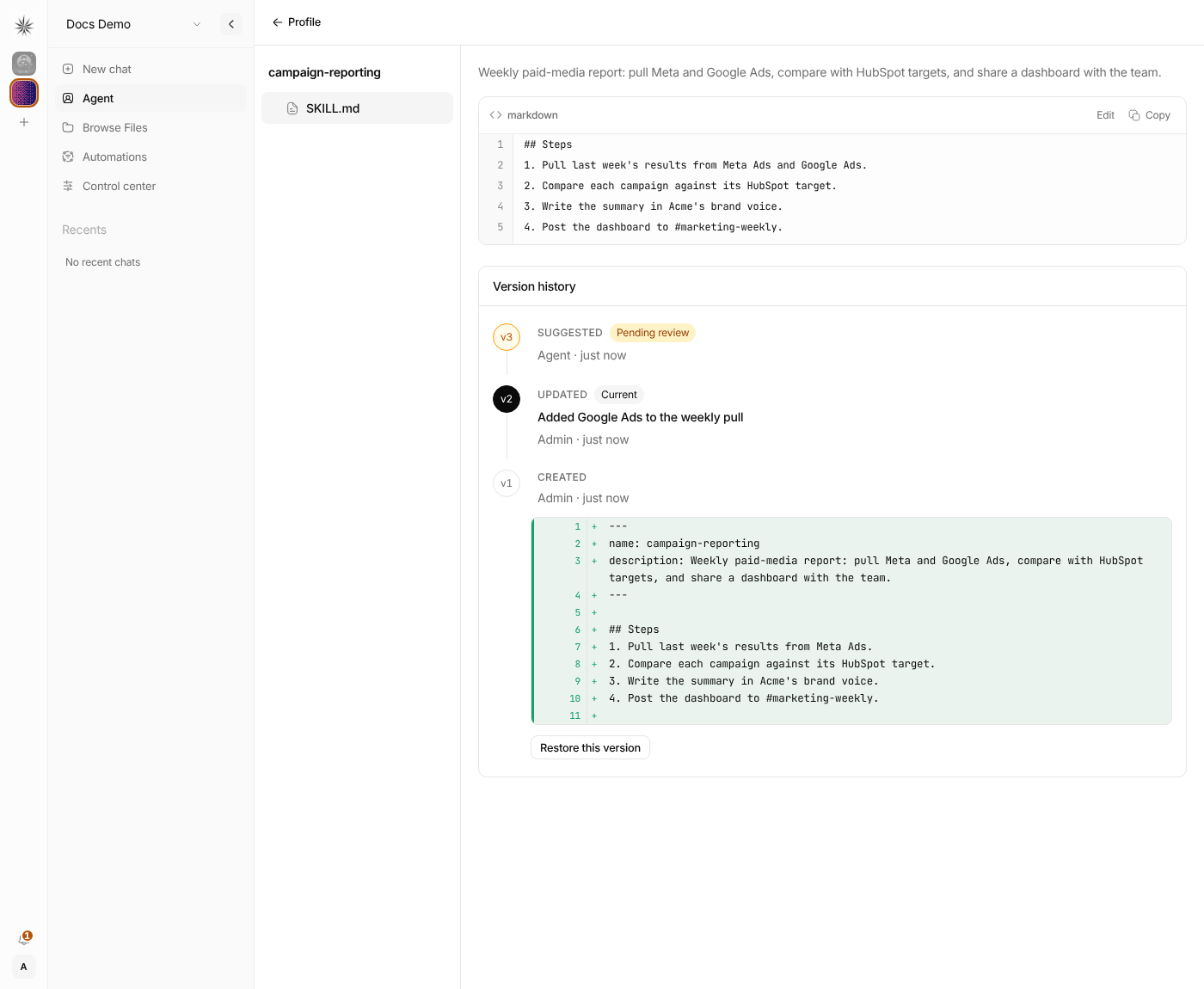
Restore does not delete history. It saves the older text as a new Restored version on top, so you can undo a restore the same way.
Version history covers SKILL.md only. Other files in the skill folder, such as templates, have no history. Bundled skills and plugin skills cannot be edited, so you cannot restore them.
Sync behavior
Nakama discovers skills from disk and syncs them into the database.
This is why there is a skills sync step:
- Files on disk are the source material
- The database stores discovered metadata for the dashboard and API
If you add or change skill folders manually, run skill sync so Nakama refreshes what it knows.
Permissions
Skill management is a platform-admin operation in the dashboard and API.
| Actor | Can manage skills | Can use a profile with skills |
|---|---|---|
| Platform admin | Yes | Yes |
| Org admin | No | Yes |
| Org member | No | Yes |
| Org viewer | No | No |
Viewers cannot invoke agents, so they cannot trigger skills either.
When to use a skill vs something else
- Use a skill for a repeatable workflow
- Use
update-profile-memoryfor user facts, preferences, and durable context (not procedures) - Use
archive-profile-memorywhen the user wants to forget, tidy, or free space in active memory without deleting history - Use the main profile prompt for always-on behavior and identity
- Use a builtin tool for a native capability like web search or file access
- Use
save-artifactwithwrite_fileorwrite_docxwhen the agent should save a file for you (reports, summaries, generated text, Word documents) underartifacts/ - Use
coding-agentwithbashwhen repo work is better handled by a dedicated coding agent (setup) - Use
agent-browserwithbashfor login walls, forms, and interactive browsing (setup) - Use an MCP server for external tool integrations
Next steps
- Profiles — how skills attach to a bot
- Self-improving skills — agents save workflows as skills; optional admin approval
- Coding agent — skill-driven install and the
coding-agentskill - Agent browser — interactive browsing via
bashand theagent-browserskill - Builtin tools — the actions a profile can take
- MCP servers — external tools assigned to a profile