Outbound notifications
Send payment updates, failed job alerts, and deployment notifications from external apps through Telegram, Discord, or WhatsApp.
Another app calls a Nakama webhook, and Nakama posts the notification through the selected agent's connection. Users do not need to start a chat with the agent to receive each alert.
This is useful for things like:
- new payment notifications
- failed job alerts
- deploy finished messages
- support or sales event notifications
How it works
- Open Control center → Notifications
- Choose the agent whose connection should send the notification
- Choose Telegram, Discord, or WhatsApp, then enter a name
- For Telegram, paste a topic link such as
https://t.me/c/3734526664/147. For Discord, enter the target channel or thread ID. For WhatsApp, check the displayed paired contact. - Save and copy the generated webhook URL and API key
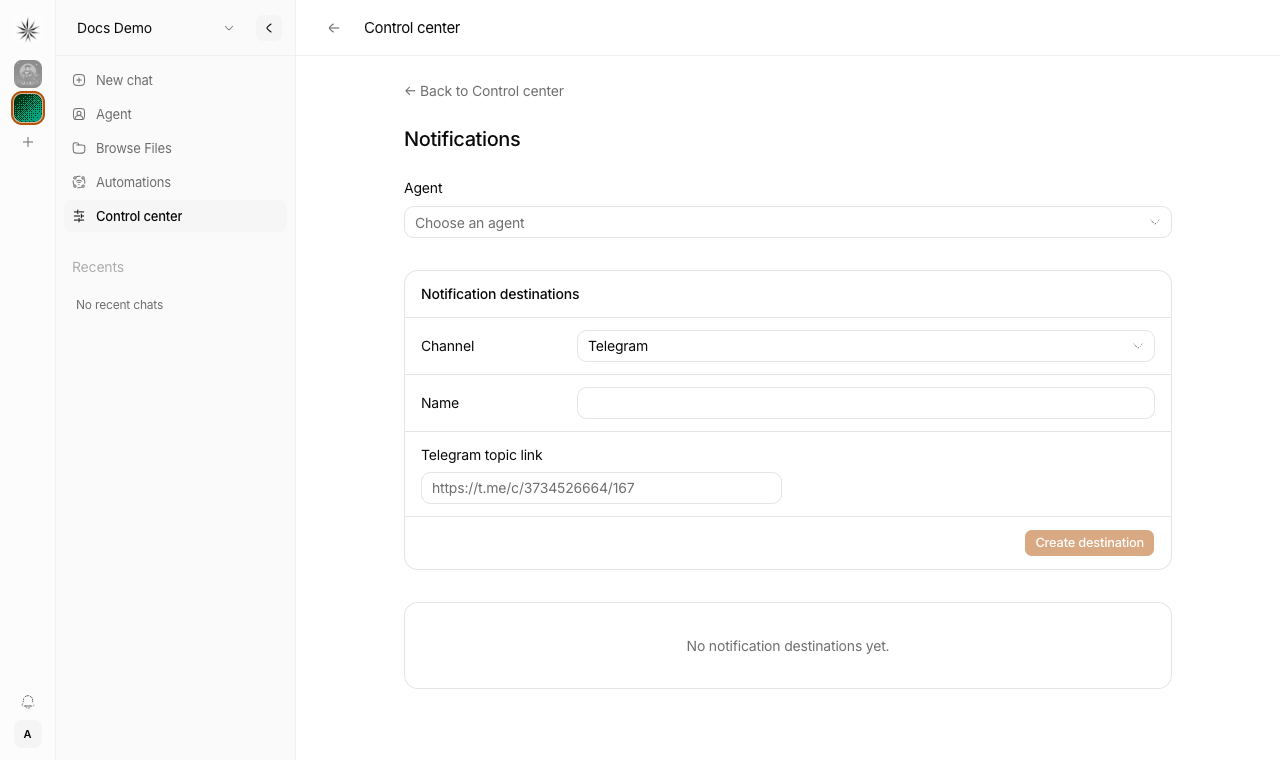
Each destination belongs to one organization and uses one agent's connection. If that connection is unavailable, delivery fails instead of using another agent. Older Telegram destinations without an agent require you to select one before delivery resumes.
Telegram notifications go directly to the linked topic. Discord notifications go to the specified channel or thread, where the bot needs permission to send messages. To copy a Discord channel ID, enable Developer Mode in Discord and use Copy Channel ID on the channel.
WhatsApp notifications go to the agent's current paired contact. Changing the pairing changes the recipient for all of that agent's WhatsApp destinations. Pair the contact before creating a destination, and keep the WhatsApp worker connected. Arbitrary phone numbers and WhatsApp groups are not supported here.
Use Edit on a destination to change its name, agent, or target. To switch channels, create a new destination. Key rotation and deletion work the same way for every channel.
Webhook payload
Nakama keeps the webhook contract intentionally small.
Send a POST request with JSON like this:
{
  "title": "Payment received",
  "body": "Order #INV-1042 paid by Acme Co.",
  "level": "success"
}
Required headers:
X-API-Key— the destination API keyIdempotency-Key— a unique id per event (max 128 characters). Replays of the same key are rejected and do not send again. Claims are kept for 7 days, including after a failed delivery, so a lost success response cannot unlock a second delivery.
body is required.
title is optional.
level is optional and can be info, success, warning, or error.
Nakama sends the title, body, and level indicator through the chosen channel. WhatsApp uses plain text; Telegram and Discord retain title emphasis.
Design note
Nakama accepts simple notification text rather than arbitrary templates or custom channel payloads.
That is intentional:
- the webhook stays stable and easy to validate
- external apps only need to send simple notification text
- all three channels use the same webhook shape
Notification destinations for groups and topics
From Control center → Notifications, Nakama can create Telegram webhook destinations for a group or a forum topic.
If you already have a topic share link such as:
https://t.me/c/3734526664/147you can derive the form values directly:
Telegram chat ID: prefix the number after/c/with-100→-1003734526664Telegram topic ID: use the last path segment →147
This matches what Telegram Bot API returns in:
message.chat.idmessage.message_thread_id
If you prefer the API method, send a fresh message in the target topic and call:
https://api.telegram.org/bot<BOT_TOKEN>/getUpdatesThen copy message.chat.id and message.message_thread_id from the matching update.